> ## Documentation Index
> Fetch the complete documentation index at: https://docs-staging-fix-update-domain-refs.mintlify.site/llms.txt
> Use this file to discover all available pages before exploring further.

> Learn how to configure an update policy form using Forms for Actions for users to review and accept new terms of service or consent updates.

# Use Cases: Configure an update policy form using Forms

<Card title="Before you start">
  1. Create a [Machine-to-Machine Application](/docs/get-started/auth0-overview/create-applications/machine-to-machine-apps) with the following scopes enabled:

  * `read:users`
  * `update:users`
  * `create:users`
  * `read:users_app_metadata`
  * `update:users_app_metadata`
  * `create:users_app_metadata`

  2. Add a [Vault connection](/docs/customize/forms/vault) using the M2M application credentials.
</Card>

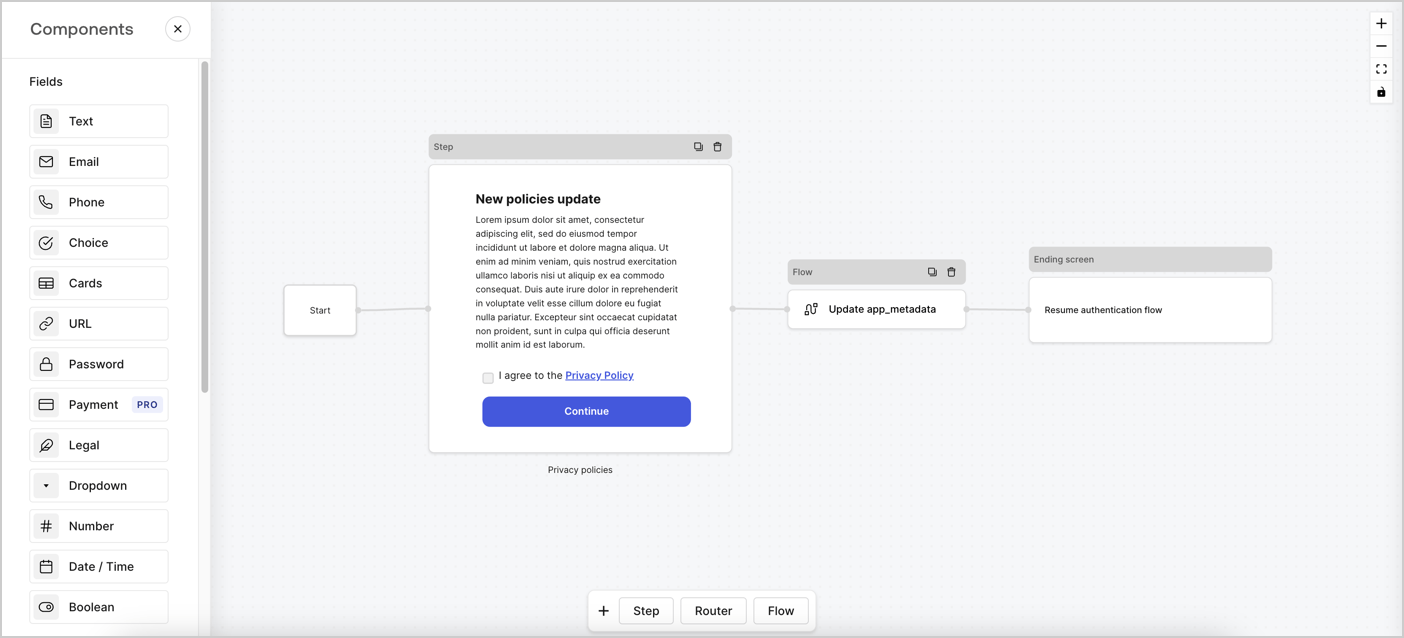
Forms for Actions allows you to create custom privacy policies flows and store the consent under the `app_metadata` object.
<Frame>
  <img src="https://mintcdn.com/docs-staging-fix-update-domain-refs/ES0hw8-m_dGRKk_n/docs/images/cdy7uua7fh8z/6i68dMvHDTijfRmSgN1x8Q/ad900e7d4c0fb34645921435472b8684/privavy-policy-form.png?fit=max&auto=format&n=ES0hw8-m_dGRKk_n&q=85&s=432fed26528eb41c6d09c9e5dc32a90f" alt="Dashboard > Actions > Forms > Privacy policy use case" data-og-width="1404" width="1404" data-og-height="638" height="638" data-path="docs/images/cdy7uua7fh8z/6i68dMvHDTijfRmSgN1x8Q/ad900e7d4c0fb34645921435472b8684/privavy-policy-form.png" data-optimize="true" data-opv="3" srcset="https://mintcdn.com/docs-staging-fix-update-domain-refs/ES0hw8-m_dGRKk_n/docs/images/cdy7uua7fh8z/6i68dMvHDTijfRmSgN1x8Q/ad900e7d4c0fb34645921435472b8684/privavy-policy-form.png?w=280&fit=max&auto=format&n=ES0hw8-m_dGRKk_n&q=85&s=1f61667d7f39d19e0b10b78333a720c5 280w, https://mintcdn.com/docs-staging-fix-update-domain-refs/ES0hw8-m_dGRKk_n/docs/images/cdy7uua7fh8z/6i68dMvHDTijfRmSgN1x8Q/ad900e7d4c0fb34645921435472b8684/privavy-policy-form.png?w=560&fit=max&auto=format&n=ES0hw8-m_dGRKk_n&q=85&s=5417b5c03360df50c87c21fda0ba26aa 560w, https://mintcdn.com/docs-staging-fix-update-domain-refs/ES0hw8-m_dGRKk_n/docs/images/cdy7uua7fh8z/6i68dMvHDTijfRmSgN1x8Q/ad900e7d4c0fb34645921435472b8684/privavy-policy-form.png?w=840&fit=max&auto=format&n=ES0hw8-m_dGRKk_n&q=85&s=502ac041740cbbc68b7a4e3d1c6fe6ea 840w, https://mintcdn.com/docs-staging-fix-update-domain-refs/ES0hw8-m_dGRKk_n/docs/images/cdy7uua7fh8z/6i68dMvHDTijfRmSgN1x8Q/ad900e7d4c0fb34645921435472b8684/privavy-policy-form.png?w=1100&fit=max&auto=format&n=ES0hw8-m_dGRKk_n&q=85&s=606729cb5625258e7925cbe4025d796c 1100w, https://mintcdn.com/docs-staging-fix-update-domain-refs/ES0hw8-m_dGRKk_n/docs/images/cdy7uua7fh8z/6i68dMvHDTijfRmSgN1x8Q/ad900e7d4c0fb34645921435472b8684/privavy-policy-form.png?w=1650&fit=max&auto=format&n=ES0hw8-m_dGRKk_n&q=85&s=34577f9538b33c9d6032983bb718cb28 1650w, https://mintcdn.com/docs-staging-fix-update-domain-refs/ES0hw8-m_dGRKk_n/docs/images/cdy7uua7fh8z/6i68dMvHDTijfRmSgN1x8Q/ad900e7d4c0fb34645921435472b8684/privavy-policy-form.png?w=2500&fit=max&auto=format&n=ES0hw8-m_dGRKk_n&q=85&s=f1f295fe92151e39741c280c772ac803 2500w" />
</Frame>

The sections below outline how you can create an Update Policy form using nodes and flows, along with steps for adding your form to a [Post Login](/docs/customize/actions/explore-triggers/signup-and-login-triggers/login-trigger) Action.

## Create a form from scratch

Follow these steps to create a form to gather information:

1. Open the Form editor by selecting **Auth0 Dashboard > Actions > Forms.**
2. Select **Create Form** > **Start from scratch**.

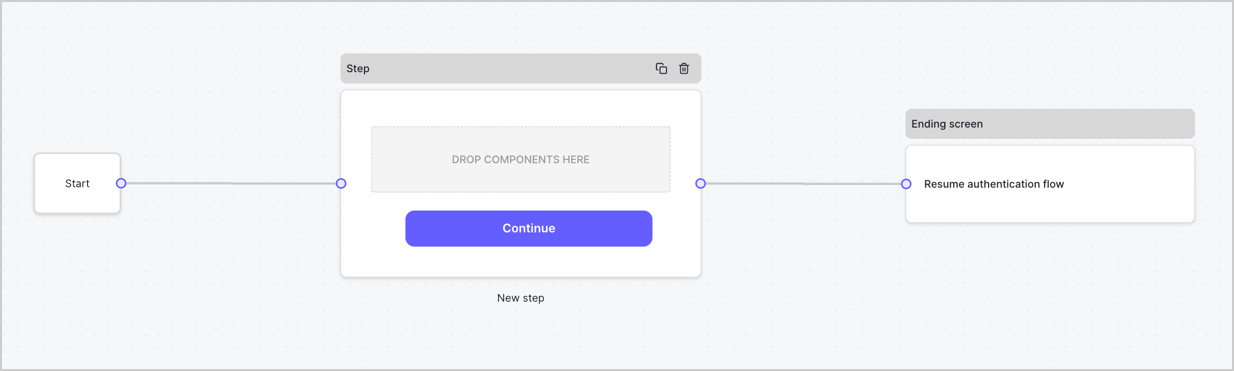
By default, a new form contains a Start node, a Step node, and an Ending screen node.
<Frame>
  <img src="https://mintcdn.com/docs-staging-fix-update-domain-refs/C1JARkIrC9Arc3mb/docs/images/cdy7uua7fh8z/2TZ9jSjgEcARFpULI6hz4R/a4319a1bd482f2ee5cc23100fdb2f42c/New-form-Forms-for-action-use-case.png?fit=max&auto=format&n=C1JARkIrC9Arc3mb&q=85&s=b657cfc9d97305de27eef81d8267bd1d" alt="Dashboard > Forms > Use Cases > Form" data-og-width="1234" width="1234" data-og-height="371" height="371" data-path="docs/images/cdy7uua7fh8z/2TZ9jSjgEcARFpULI6hz4R/a4319a1bd482f2ee5cc23100fdb2f42c/New-form-Forms-for-action-use-case.png" data-optimize="true" data-opv="3" srcset="https://mintcdn.com/docs-staging-fix-update-domain-refs/C1JARkIrC9Arc3mb/docs/images/cdy7uua7fh8z/2TZ9jSjgEcARFpULI6hz4R/a4319a1bd482f2ee5cc23100fdb2f42c/New-form-Forms-for-action-use-case.png?w=280&fit=max&auto=format&n=C1JARkIrC9Arc3mb&q=85&s=d70ed27a118630b25bbafd2aae0ed628 280w, https://mintcdn.com/docs-staging-fix-update-domain-refs/C1JARkIrC9Arc3mb/docs/images/cdy7uua7fh8z/2TZ9jSjgEcARFpULI6hz4R/a4319a1bd482f2ee5cc23100fdb2f42c/New-form-Forms-for-action-use-case.png?w=560&fit=max&auto=format&n=C1JARkIrC9Arc3mb&q=85&s=5148662563d2326b7fe5b5200659688d 560w, https://mintcdn.com/docs-staging-fix-update-domain-refs/C1JARkIrC9Arc3mb/docs/images/cdy7uua7fh8z/2TZ9jSjgEcARFpULI6hz4R/a4319a1bd482f2ee5cc23100fdb2f42c/New-form-Forms-for-action-use-case.png?w=840&fit=max&auto=format&n=C1JARkIrC9Arc3mb&q=85&s=0a314e3179aa17b366e9c8a987f7c64d 840w, https://mintcdn.com/docs-staging-fix-update-domain-refs/C1JARkIrC9Arc3mb/docs/images/cdy7uua7fh8z/2TZ9jSjgEcARFpULI6hz4R/a4319a1bd482f2ee5cc23100fdb2f42c/New-form-Forms-for-action-use-case.png?w=1100&fit=max&auto=format&n=C1JARkIrC9Arc3mb&q=85&s=9225f7697fb11bf4f54a7f7a46d65a75 1100w, https://mintcdn.com/docs-staging-fix-update-domain-refs/C1JARkIrC9Arc3mb/docs/images/cdy7uua7fh8z/2TZ9jSjgEcARFpULI6hz4R/a4319a1bd482f2ee5cc23100fdb2f42c/New-form-Forms-for-action-use-case.png?w=1650&fit=max&auto=format&n=C1JARkIrC9Arc3mb&q=85&s=d96571a08a9a3a9be98bc3a7b3e9d115 1650w, https://mintcdn.com/docs-staging-fix-update-domain-refs/C1JARkIrC9Arc3mb/docs/images/cdy7uua7fh8z/2TZ9jSjgEcARFpULI6hz4R/a4319a1bd482f2ee5cc23100fdb2f42c/New-form-Forms-for-action-use-case.png?w=2500&fit=max&auto=format&n=C1JARkIrC9Arc3mb&q=85&s=1dd6191d21689873de7c686320ba76de 2500w" />
</Frame>

### Configure the Step node

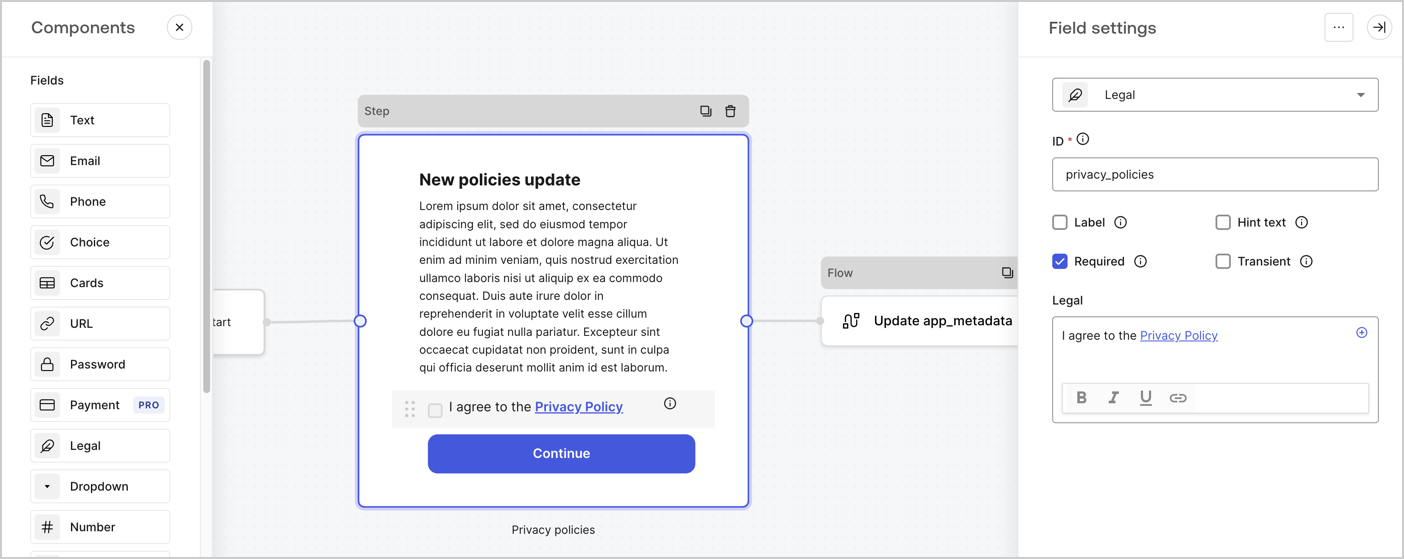
The Step node is the graphical interface visible to users. Add [Fields](/docs/customize/forms/nodes-and-components) to the Step node to collect the new agreement acceptance value by following these steps:

1. Drag a **Rich text** field from the **Components menu** into the **Step** node.

   * **Rich text**: Enter a description of your privacy policies updates.
   * Select **Save**.
2. Drag a **Legal** field into the **Step** node.

   * **ID**: Enter `privacy_policies`.
   * **Required**: Enable the checkbox.
   * **Legal**: Enter `I agree to the Privacy Policy`.
   * Select **Save**.
3. Select **Publish** to save.
<Frame>
  <img src="https://mintcdn.com/docs-staging-fix-update-domain-refs/I3Pry9-OgSDV9su-/docs/images/cdy7uua7fh8z/59zFFjQjAnjogkc2QGIqqJ/0ad66b1b636544122aa4e65968b76c2c/privacy-policy-step-node.png?fit=max&auto=format&n=I3Pry9-OgSDV9su-&q=85&s=63083ccb830fe466509ae196ba384bae" alt="Dashboard > Actions > Forms > Use case privacy policy step node" data-og-width="1404" width="1404" data-og-height="559" height="559" data-path="docs/images/cdy7uua7fh8z/59zFFjQjAnjogkc2QGIqqJ/0ad66b1b636544122aa4e65968b76c2c/privacy-policy-step-node.png" data-optimize="true" data-opv="3" srcset="https://mintcdn.com/docs-staging-fix-update-domain-refs/I3Pry9-OgSDV9su-/docs/images/cdy7uua7fh8z/59zFFjQjAnjogkc2QGIqqJ/0ad66b1b636544122aa4e65968b76c2c/privacy-policy-step-node.png?w=280&fit=max&auto=format&n=I3Pry9-OgSDV9su-&q=85&s=0bbfc8e57721f7eb5cf565fb4df8342a 280w, https://mintcdn.com/docs-staging-fix-update-domain-refs/I3Pry9-OgSDV9su-/docs/images/cdy7uua7fh8z/59zFFjQjAnjogkc2QGIqqJ/0ad66b1b636544122aa4e65968b76c2c/privacy-policy-step-node.png?w=560&fit=max&auto=format&n=I3Pry9-OgSDV9su-&q=85&s=b46819bda7b0cde5d4a48882e85bdb82 560w, https://mintcdn.com/docs-staging-fix-update-domain-refs/I3Pry9-OgSDV9su-/docs/images/cdy7uua7fh8z/59zFFjQjAnjogkc2QGIqqJ/0ad66b1b636544122aa4e65968b76c2c/privacy-policy-step-node.png?w=840&fit=max&auto=format&n=I3Pry9-OgSDV9su-&q=85&s=6581ebde1e0496577af80d1505d017a6 840w, https://mintcdn.com/docs-staging-fix-update-domain-refs/I3Pry9-OgSDV9su-/docs/images/cdy7uua7fh8z/59zFFjQjAnjogkc2QGIqqJ/0ad66b1b636544122aa4e65968b76c2c/privacy-policy-step-node.png?w=1100&fit=max&auto=format&n=I3Pry9-OgSDV9su-&q=85&s=594a518868b638b65cf7bad4ec02708b 1100w, https://mintcdn.com/docs-staging-fix-update-domain-refs/I3Pry9-OgSDV9su-/docs/images/cdy7uua7fh8z/59zFFjQjAnjogkc2QGIqqJ/0ad66b1b636544122aa4e65968b76c2c/privacy-policy-step-node.png?w=1650&fit=max&auto=format&n=I3Pry9-OgSDV9su-&q=85&s=f2fa1287e1e397fc8018df3f0add88db 1650w, https://mintcdn.com/docs-staging-fix-update-domain-refs/I3Pry9-OgSDV9su-/docs/images/cdy7uua7fh8z/59zFFjQjAnjogkc2QGIqqJ/0ad66b1b636544122aa4e65968b76c2c/privacy-policy-step-node.png?w=2500&fit=max&auto=format&n=I3Pry9-OgSDV9su-&q=85&s=69a6f4f3dda24686cc755371fa5bc799 2500w" />
</Frame>

### Configure the Flow node

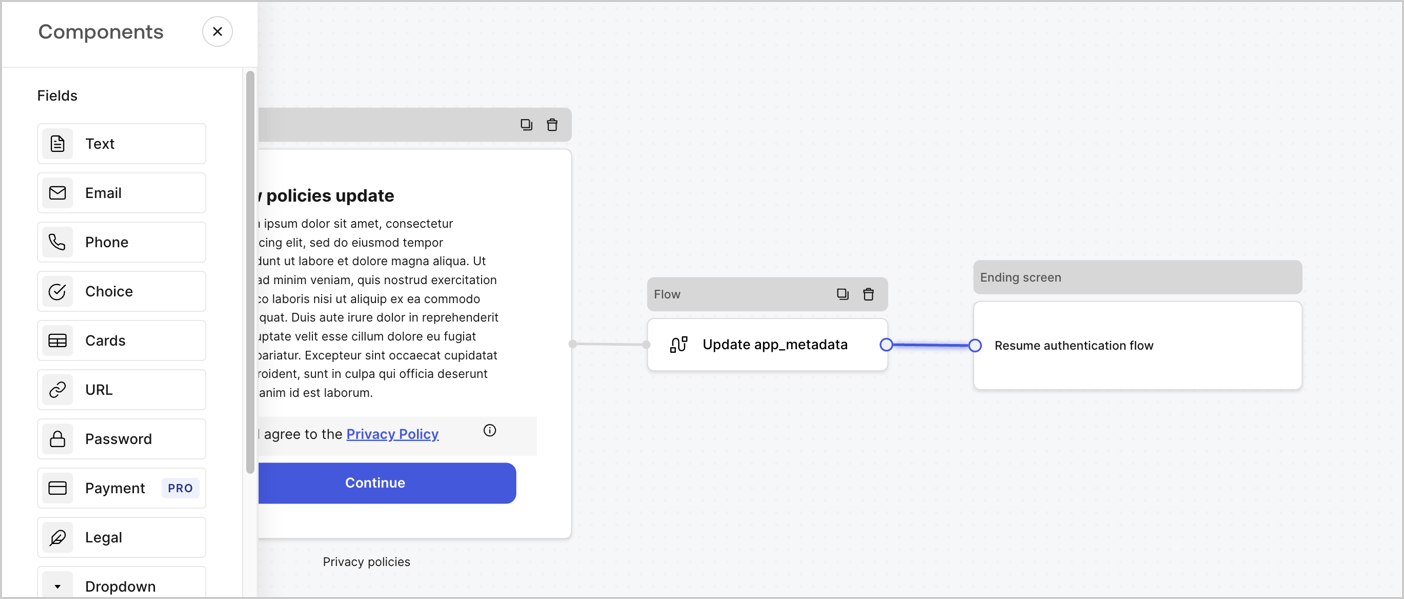
Add a **Flow** node after the **Step** node to update the `app_metadata` and resume the authentication flow by following these steps:

1. Select **Flow** from the bottom of the Form editor.
2. Remove the existing link between the **Step** and **Ending Screen** nodes.
3. Select the new **Flow** > **Click to add a flow** > **Create a new flow.**

   * Enter `Update app_metadata` in the **Name** field.
   * Select **Create**.
   * Select **Save**.
4. Link the **Flow** node to the **Step** and **Ending Screen** nodes as pictured below.
5. Select **Publish** to save.
<Frame>
  <img src="https://mintcdn.com/docs-staging-fix-update-domain-refs/ES0hw8-m_dGRKk_n/docs/images/cdy7uua7fh8z/6YIkzm7SrpM9LW76AXuRzh/353c518fe82bbaa440836da1d83596d6/link-policies.png?fit=max&auto=format&n=ES0hw8-m_dGRKk_n&q=85&s=fd5c0c04487367ddf254dd86be6a6eb6" alt="Dashboard > Actions > Forms > Form" data-og-width="1404" width="1404" data-og-height="599" height="599" data-path="docs/images/cdy7uua7fh8z/6YIkzm7SrpM9LW76AXuRzh/353c518fe82bbaa440836da1d83596d6/link-policies.png" data-optimize="true" data-opv="3" srcset="https://mintcdn.com/docs-staging-fix-update-domain-refs/ES0hw8-m_dGRKk_n/docs/images/cdy7uua7fh8z/6YIkzm7SrpM9LW76AXuRzh/353c518fe82bbaa440836da1d83596d6/link-policies.png?w=280&fit=max&auto=format&n=ES0hw8-m_dGRKk_n&q=85&s=14c248a95dcc78b42ce9096eed463f2a 280w, https://mintcdn.com/docs-staging-fix-update-domain-refs/ES0hw8-m_dGRKk_n/docs/images/cdy7uua7fh8z/6YIkzm7SrpM9LW76AXuRzh/353c518fe82bbaa440836da1d83596d6/link-policies.png?w=560&fit=max&auto=format&n=ES0hw8-m_dGRKk_n&q=85&s=f052b72c5fcccd23e49e0da24126c450 560w, https://mintcdn.com/docs-staging-fix-update-domain-refs/ES0hw8-m_dGRKk_n/docs/images/cdy7uua7fh8z/6YIkzm7SrpM9LW76AXuRzh/353c518fe82bbaa440836da1d83596d6/link-policies.png?w=840&fit=max&auto=format&n=ES0hw8-m_dGRKk_n&q=85&s=8739b78186818d17269c5747eab2b085 840w, https://mintcdn.com/docs-staging-fix-update-domain-refs/ES0hw8-m_dGRKk_n/docs/images/cdy7uua7fh8z/6YIkzm7SrpM9LW76AXuRzh/353c518fe82bbaa440836da1d83596d6/link-policies.png?w=1100&fit=max&auto=format&n=ES0hw8-m_dGRKk_n&q=85&s=203af6a4f739f1398afa432afcd965a7 1100w, https://mintcdn.com/docs-staging-fix-update-domain-refs/ES0hw8-m_dGRKk_n/docs/images/cdy7uua7fh8z/6YIkzm7SrpM9LW76AXuRzh/353c518fe82bbaa440836da1d83596d6/link-policies.png?w=1650&fit=max&auto=format&n=ES0hw8-m_dGRKk_n&q=85&s=d6f3adb88a6559717a859a07eb1cc7cf 1650w, https://mintcdn.com/docs-staging-fix-update-domain-refs/ES0hw8-m_dGRKk_n/docs/images/cdy7uua7fh8z/6YIkzm7SrpM9LW76AXuRzh/353c518fe82bbaa440836da1d83596d6/link-policies.png?w=2500&fit=max&auto=format&n=ES0hw8-m_dGRKk_n&q=85&s=997aa5f3c545a4100ac656382c5295fd 2500w" />
</Frame>

Add an Auth0 Update user action to the flow by following these steps:

1. Select the **Flow** **Update app\_metadata** > **Edit flow** to open the Flow editor in a new tab.
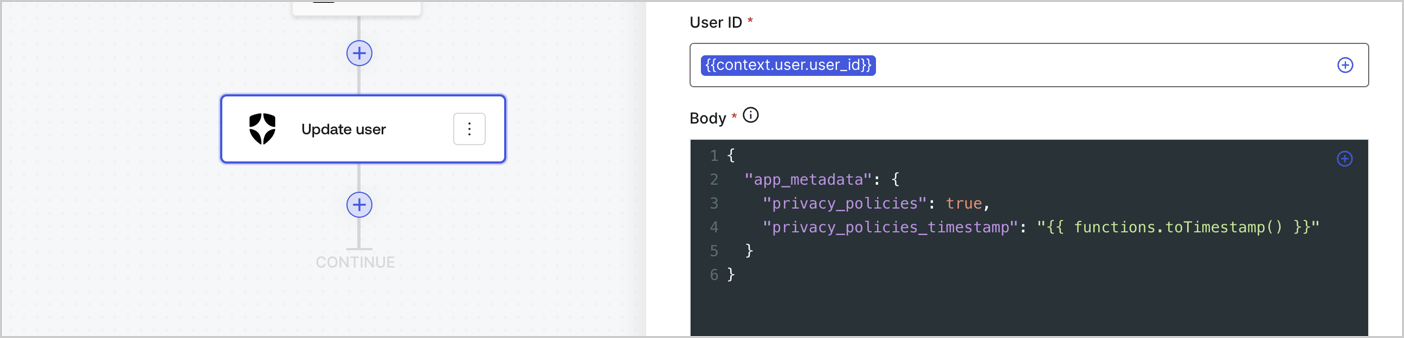
2. Below the StartAction, select the **+** icon to add an **Update user** action. Complete the fields below, then select **Save** to continue.

   * **Connection**: Select from the dropdown the Vault connection to your M2M application.

   * **User ID**: Enter `{{context.user.user_id}}`.

   * **Body**: Copy and paste the following code to update the app\_metadata with the privacy\_policies and privacy\_policies\_timestamp properties.

     ```text lines theme={null}
     {
       "app_metadata": {
         "privacy_policies": true,
         "privacy_policies_timestamp": "{{ functions.toTimestamp() }}"
       }
     }
     ```

   * Select **Save**.
3. Select **Publish** to save.
<Frame>
  <img src="https://mintcdn.com/docs-staging-fix-update-domain-refs/QBoXAYCEabb4vYAs/docs/images/cdy7uua7fh8z/CvMNIwWrOUwaFW4X3G28p/1fb70ae57a20749d9ffaaba8dc0b7e26/update-user-privacy.png?fit=max&auto=format&n=QBoXAYCEabb4vYAs&q=85&s=562d7cc99570c6f17a9173ea6420e35c" alt="Dashboard > Actions > Forms > User case privacy policy code" data-og-width="1404" width="1404" data-og-height="338" height="338" data-path="docs/images/cdy7uua7fh8z/CvMNIwWrOUwaFW4X3G28p/1fb70ae57a20749d9ffaaba8dc0b7e26/update-user-privacy.png" data-optimize="true" data-opv="3" srcset="https://mintcdn.com/docs-staging-fix-update-domain-refs/QBoXAYCEabb4vYAs/docs/images/cdy7uua7fh8z/CvMNIwWrOUwaFW4X3G28p/1fb70ae57a20749d9ffaaba8dc0b7e26/update-user-privacy.png?w=280&fit=max&auto=format&n=QBoXAYCEabb4vYAs&q=85&s=870bbfd0d9c6a3c07f5131906f11d637 280w, https://mintcdn.com/docs-staging-fix-update-domain-refs/QBoXAYCEabb4vYAs/docs/images/cdy7uua7fh8z/CvMNIwWrOUwaFW4X3G28p/1fb70ae57a20749d9ffaaba8dc0b7e26/update-user-privacy.png?w=560&fit=max&auto=format&n=QBoXAYCEabb4vYAs&q=85&s=7839198ef8b90bdb0b9133470e2f4067 560w, https://mintcdn.com/docs-staging-fix-update-domain-refs/QBoXAYCEabb4vYAs/docs/images/cdy7uua7fh8z/CvMNIwWrOUwaFW4X3G28p/1fb70ae57a20749d9ffaaba8dc0b7e26/update-user-privacy.png?w=840&fit=max&auto=format&n=QBoXAYCEabb4vYAs&q=85&s=2f85b1d26f2fcbb0f94973b73627e0b5 840w, https://mintcdn.com/docs-staging-fix-update-domain-refs/QBoXAYCEabb4vYAs/docs/images/cdy7uua7fh8z/CvMNIwWrOUwaFW4X3G28p/1fb70ae57a20749d9ffaaba8dc0b7e26/update-user-privacy.png?w=1100&fit=max&auto=format&n=QBoXAYCEabb4vYAs&q=85&s=cbd49efae09976d8cc6c4beb7be97cc6 1100w, https://mintcdn.com/docs-staging-fix-update-domain-refs/QBoXAYCEabb4vYAs/docs/images/cdy7uua7fh8z/CvMNIwWrOUwaFW4X3G28p/1fb70ae57a20749d9ffaaba8dc0b7e26/update-user-privacy.png?w=1650&fit=max&auto=format&n=QBoXAYCEabb4vYAs&q=85&s=b1f54fa2676a02a28bc59dc65aeb0e20 1650w, https://mintcdn.com/docs-staging-fix-update-domain-refs/QBoXAYCEabb4vYAs/docs/images/cdy7uua7fh8z/CvMNIwWrOUwaFW4X3G28p/1fb70ae57a20749d9ffaaba8dc0b7e26/update-user-privacy.png?w=2500&fit=max&auto=format&n=QBoXAYCEabb4vYAs&q=85&s=75afd8c883ec4501851e04e0160dff6d 2500w" />
</Frame>

<Callout icon="file-lines" color="#0EA5E9" iconType="regular">
  The flow **Update app\_metadata** adds a `privacy_policies true` value to the app`_metadata` object and also generates a timestamp with a [helper function.](/docs/customize/forms/variables)
</Callout>

## Retrieve the form render code

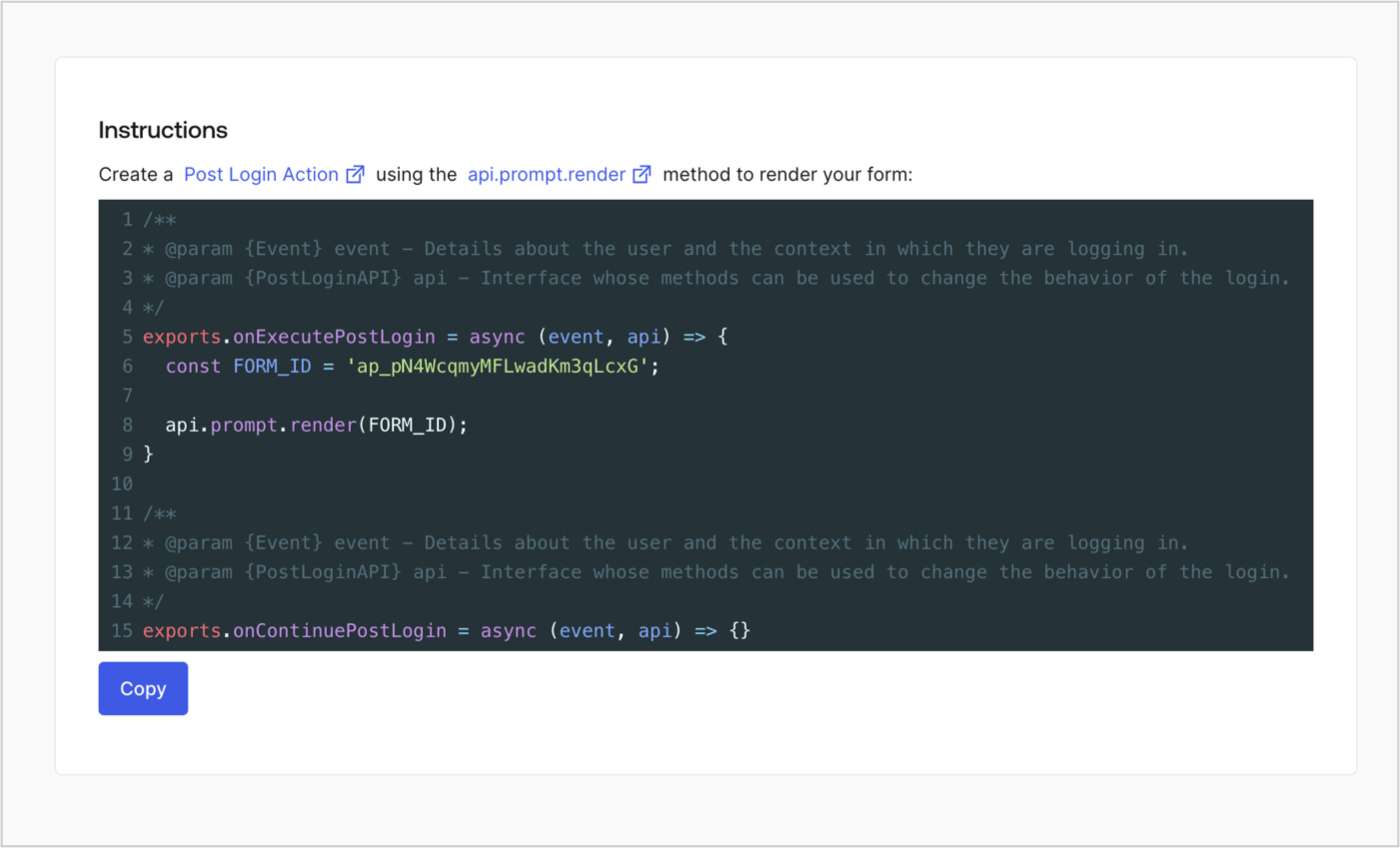
Retrieve your form render code to visually render the form with a custom Post Login Action by following these steps:

* From the Form editor, select **`<> Render`**.
* Select **Copy**.
<Frame>
  <img src="https://mintcdn.com/docs-staging-fix-update-domain-refs/15u53xBv6k_VQqMq/docs/images/cdy7uua7fh8z/2EIUzc539sq9lwoTKbjoJv/496a864c0fc44a782c9cadca119dbfb0/embed.png?fit=max&auto=format&n=15u53xBv6k_VQqMq&q=85&s=7192f00cb68e4a8247ef24d6a852b78a" alt="Dashboard > Actions > Forms > Form > Embed" data-og-width="1400" width="1400" data-og-height="848" height="848" data-path="docs/images/cdy7uua7fh8z/2EIUzc539sq9lwoTKbjoJv/496a864c0fc44a782c9cadca119dbfb0/embed.png" data-optimize="true" data-opv="3" srcset="https://mintcdn.com/docs-staging-fix-update-domain-refs/15u53xBv6k_VQqMq/docs/images/cdy7uua7fh8z/2EIUzc539sq9lwoTKbjoJv/496a864c0fc44a782c9cadca119dbfb0/embed.png?w=280&fit=max&auto=format&n=15u53xBv6k_VQqMq&q=85&s=1330d0ffd8a710d3cb96e72e1d8b6017 280w, https://mintcdn.com/docs-staging-fix-update-domain-refs/15u53xBv6k_VQqMq/docs/images/cdy7uua7fh8z/2EIUzc539sq9lwoTKbjoJv/496a864c0fc44a782c9cadca119dbfb0/embed.png?w=560&fit=max&auto=format&n=15u53xBv6k_VQqMq&q=85&s=894ab4b1a04a76203fb1d9fe0d127785 560w, https://mintcdn.com/docs-staging-fix-update-domain-refs/15u53xBv6k_VQqMq/docs/images/cdy7uua7fh8z/2EIUzc539sq9lwoTKbjoJv/496a864c0fc44a782c9cadca119dbfb0/embed.png?w=840&fit=max&auto=format&n=15u53xBv6k_VQqMq&q=85&s=8b341cbac9eb87d9bc1d82753b3404b0 840w, https://mintcdn.com/docs-staging-fix-update-domain-refs/15u53xBv6k_VQqMq/docs/images/cdy7uua7fh8z/2EIUzc539sq9lwoTKbjoJv/496a864c0fc44a782c9cadca119dbfb0/embed.png?w=1100&fit=max&auto=format&n=15u53xBv6k_VQqMq&q=85&s=ee743f59bd68a1adfc689e2f6dc454ed 1100w, https://mintcdn.com/docs-staging-fix-update-domain-refs/15u53xBv6k_VQqMq/docs/images/cdy7uua7fh8z/2EIUzc539sq9lwoTKbjoJv/496a864c0fc44a782c9cadca119dbfb0/embed.png?w=1650&fit=max&auto=format&n=15u53xBv6k_VQqMq&q=85&s=031172dfc6cdbadef81e4f9d75accd53 1650w, https://mintcdn.com/docs-staging-fix-update-domain-refs/15u53xBv6k_VQqMq/docs/images/cdy7uua7fh8z/2EIUzc539sq9lwoTKbjoJv/496a864c0fc44a782c9cadca119dbfb0/embed.png?w=2500&fit=max&auto=format&n=15u53xBv6k_VQqMq&q=85&s=3c6aec578e6cef7d47c9ad20cea0e410 2500w" />
</Frame>

## Create a Post Login Action

Create a post-login Action to render your form by following these steps:

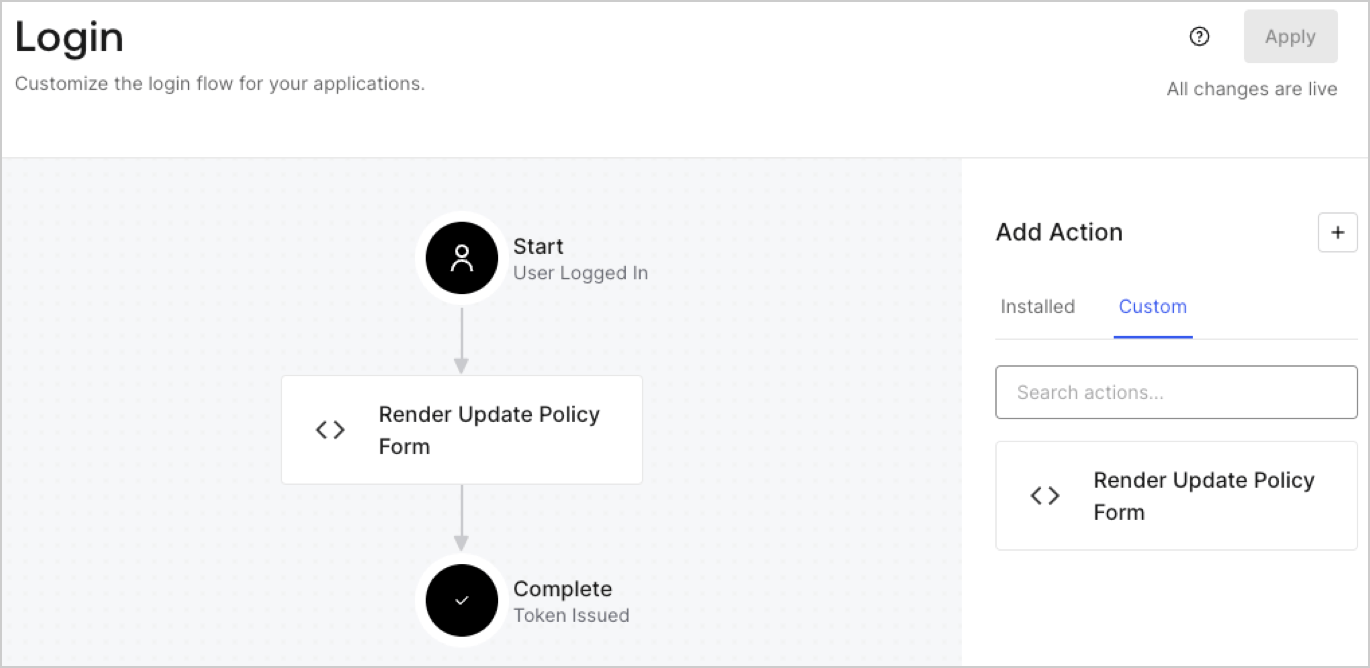
1. Navigate to **Auth0 Dashboard > Actions > Flows > Login.**
2. Select the **+** icon and Select **Build from scratch**:

   * **Name**: Enter `Render Update Policy Form`.
   * **Trigger**: Select `Login / Post Login`.
   * **Runtime**: Select the recommended version.
3. Select **Create**.

To configure the post-login Action:

1. Delete the existing code from the Code editor.
2. Paste the form render code into the Code editor.
3. Edit the code to define the conditional logic that will render the form.

   ```javascript lines theme={null}
   /**
   * @param {Event} event - Details about the user and the context in which they are logging in.
   * @param {PostLoginAPI} api - Interface whose methods can be used to change the behavior of the login.
   */
   exports.onExecutePostLogin = async (event, api) => {
     const FORM_ID = 'REPLACE_WITH_YOUR_FORM_ID';

     if (event.user.app_metadata.privacy_policies !== true) {
       api.prompt.render(FORM_ID);
     }
   }

   exports.onContinuePostLogin = async (event, api) => { }
   ```

   <Callout icon="file-lines" color="#0EA5E9" iconType="regular">
     The example code above will render the form when a user is missing the app metadata `privacy_policies` property.
   </Callout>
4. Select **Deploy.**
5. Drag and Drop the **Render Update Policy Form** Action to the **Login** flow.
   <Frame>
     <img src="https://mintcdn.com/docs-staging-fix-update-domain-refs/xHoBXQHi8cKBCqX0/docs/images/cdy7uua7fh8z/5TOwDgevZsBqd7yZynUYWU/41ca909dc3007aed4f40ff794a05efa5/postlogin.png?fit=max&auto=format&n=xHoBXQHi8cKBCqX0&q=85&s=0bf0bbc2f7ae2a63bf333b6a848ada2f" alt="Dashboard > Forms > Use Case > Render update policy form login action" data-og-width="1370" width="1370" data-og-height="668" height="668" data-path="docs/images/cdy7uua7fh8z/5TOwDgevZsBqd7yZynUYWU/41ca909dc3007aed4f40ff794a05efa5/postlogin.png" data-optimize="true" data-opv="3" srcset="https://mintcdn.com/docs-staging-fix-update-domain-refs/xHoBXQHi8cKBCqX0/docs/images/cdy7uua7fh8z/5TOwDgevZsBqd7yZynUYWU/41ca909dc3007aed4f40ff794a05efa5/postlogin.png?w=280&fit=max&auto=format&n=xHoBXQHi8cKBCqX0&q=85&s=d1c4f147f5e08a0f499503d2764fa127 280w, https://mintcdn.com/docs-staging-fix-update-domain-refs/xHoBXQHi8cKBCqX0/docs/images/cdy7uua7fh8z/5TOwDgevZsBqd7yZynUYWU/41ca909dc3007aed4f40ff794a05efa5/postlogin.png?w=560&fit=max&auto=format&n=xHoBXQHi8cKBCqX0&q=85&s=057bd1e8c089183e5594e506ea5ed1af 560w, https://mintcdn.com/docs-staging-fix-update-domain-refs/xHoBXQHi8cKBCqX0/docs/images/cdy7uua7fh8z/5TOwDgevZsBqd7yZynUYWU/41ca909dc3007aed4f40ff794a05efa5/postlogin.png?w=840&fit=max&auto=format&n=xHoBXQHi8cKBCqX0&q=85&s=bd2d9fd359f1649d7d6d98792a2b5d6f 840w, https://mintcdn.com/docs-staging-fix-update-domain-refs/xHoBXQHi8cKBCqX0/docs/images/cdy7uua7fh8z/5TOwDgevZsBqd7yZynUYWU/41ca909dc3007aed4f40ff794a05efa5/postlogin.png?w=1100&fit=max&auto=format&n=xHoBXQHi8cKBCqX0&q=85&s=5cf57811f3451e0a223f4c0d8497c2c1 1100w, https://mintcdn.com/docs-staging-fix-update-domain-refs/xHoBXQHi8cKBCqX0/docs/images/cdy7uua7fh8z/5TOwDgevZsBqd7yZynUYWU/41ca909dc3007aed4f40ff794a05efa5/postlogin.png?w=1650&fit=max&auto=format&n=xHoBXQHi8cKBCqX0&q=85&s=cefe173ddbda4d9726b43e9e7f31ebaa 1650w, https://mintcdn.com/docs-staging-fix-update-domain-refs/xHoBXQHi8cKBCqX0/docs/images/cdy7uua7fh8z/5TOwDgevZsBqd7yZynUYWU/41ca909dc3007aed4f40ff794a05efa5/postlogin.png?w=2500&fit=max&auto=format&n=xHoBXQHi8cKBCqX0&q=85&s=d30a7dc2695f16a00e2690a3dd05724b 2500w" />
   </Frame>
6. Select **Apply.**

### Test implementation

Test the implementation by following these steps:

1. Log in with an existing user whose app`_metadata` attribute `privacy_policies` does not have a value.
2. The post-login Action in the Login flow will render the form and prompt for acceptance.
3. Select **Auth0 Dashboard > User Management > Users,** locate the user and verify that the `app_metadata` attribute `privacy_policies` contains a `true` value and a timestamp.
